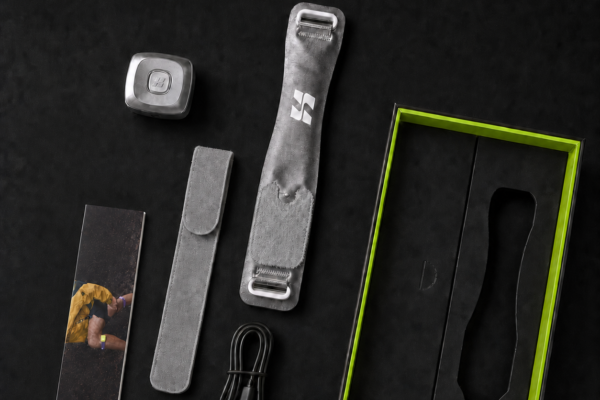
Correct placement is the first step toward a secure and comfortable experience with Xtand Orion.
The strap should sit approximately 3–5 cm below the kneecap, with the logo facing forward and the AI computing module positioned on the outer side of the knee. The fit should be snug but not tight—you should be able to slide one finger beneath the strap without forcing it.
Use the following instructions before running, training, hiking, or participating in another permitted activity.
Quick fit: 3–5 cm below the kneecap, logo forward, AI module on the outer side, buckle secure, and one finger of space beneath the strap.
Before You Put On Xtand Orion
Before each use, inspect the strap, buckle, valve, AI module, and charging port.
Do not use the device if you notice:
Cracks or deformation
A loose module
A leaking valve
Swelling or unusual heat
Exposed wiring
Water intrusion
Corrosion or an unusual odor
A damaged buckle or strap
Make sure the product and your skin are clean and dry.
For first-time setup, fully charge the detached AI module using the supplied cable or a compatible USB Type-C cable and a certified DC 5V power source. Never charge the module while wearing the product.
Xtand’s setup guide also instructs first-time users to pair Orion with the Xtand App. Once configured, Orion can operate independently; the app is used for features such as mode selection, pressure settings, and activity information. Review the complete official setup and safety guide before first use.
Step 1: Attach the AI Module
Before putting on the strap, confirm that the module and air valve are clean, dry, and undamaged.
To attach the module:
Align the module’s air outlet with the strap’s air valve.
Press the module evenly into position until it is fully seated.
Do not twist, strike, or force the module.
Confirm that it feels secure and does not move independently from the valve.
Do not use Xtand Orion if the module remains loose or the valve appears to leak.
Step 2: Position the Strap Below the Kneecap
Place Xtand Orion approximately 3–5 cm below the kneecap.
The strap should wrap around the upper part of the lower leg rather than sit directly across the kneecap. Position the Xtand logo so that it faces forward.
Make sure that:
The strap is centered below the kneecap.
The logo faces forward.
The fabric lies flat.
The strap is not folded or twisted.
The contact area is clean and dry.
Direct contact with clean, dry skin generally provides the most stable fit. Users with sensitive skin may wear a thin, clean layer underneath if it does not interfere with the fit or sensors.
Do not wear Orion over wet skin, lotion, ointment, or loose clothing.
Step 3: Place the AI Module on the Outer Side
The AI computing module should sit on the outer side of the knee.
This means the module should be positioned on the side of the leg facing away from the other knee. On the right leg, it sits on the right side. On the left leg, it sits on the left side.
Correct orientation helps the built-in sensors collect movement information as intended. An incorrectly positioned or loose module may affect movement recognition and the support response.
Step 4: Secure the Buckle and Adjust the Fit
Thread and secure the buckle, then gradually adjust the strap until it feels snug but not tight.
Use the one-finger check:
You should be able to insert one finger beneath the strap without forcing it.
The strap should remain in position without creating excessive pressure. More tension does not necessarily produce a better result and may increase discomfort or circulation risk.
Loosen or remove the product immediately if you experience:
Numbness or tingling
Coldness below the strap
Skin discoloration
Increasing pain
Swelling or throbbing
Burning
Loss of sensation
Restricted movement
If these symptoms do not resolve promptly after removal, seek medical care.
Step 5: Power On Xtand Orion
Once the strap and module are correctly positioned, press and hold the module button for approximately three seconds.
A rapidly flashing orange light indicates the startup-ready state. When Intelligent Mode is active, the indicator displays a steady white light.
The current official LED references include:
Device status
LED indication
Power startup ready
Rapidly flashing orange
Intelligent Mode active
Steady white
Walking detected
Blue
Running detected
Yellow
Stair climbing detected
Red
Fully charged
Steady green
LED behavior and software features may change with firmware updates, so consult the latest Xtand Orion manual if the indicator differs.
Step 6: Begin With Low Pressure
Start at the lowest suitable pressure and reassess the fit after several minutes.
Xtand Orion provides a nominal adjustable pressure range of 0–50 kPa, but higher pressure is not automatically better. Select a setting that feels secure and comfortable.
In Intelligent Mode, Orion uses sensor input and software to adjust its support response based on detected activity. Manual Mode applies a fixed pressure selected through the Xtand App.
Movement recognition can be affected by fit, anatomy, clothing, battery level, rapid transitions, firmware, and other conditions. Always pay attention to how the device feels instead of assuming the algorithm has identified every movement correctly.
Step 7: Perform a Low-Intensity Movement Check
Before beginning a demanding workout, test Xtand Orion in a safe, controlled environment.
Try the following:
Walk for several steps.
Bend and straighten your knee.
Perform a shallow, controlled squat.
Walk again and recheck the strap.
Confirm that:
The strap remains 3–5 cm below the kneecap.
The AI module stays on the outer side.
The buckle remains secure.
The strap does not twist, rotate, or slip.
Your knee moves naturally.
You feel no excessive pressure or discomfort.
During your first few uses, check your skin after approximately 10–15 minutes and again after removing the product.
If the strap slips, rotates, loosens, or changes the way you walk, stop the activity and refit it before continuing.
Quick Wearing Guide
Checkpoint
Correct setup
Strap position
Approximately 3–5 cm below the kneecap
Logo position
Facing forward
AI module
On the outer side of the knee
Strap surface
Flat, dry, and untwisted
Tightness
Snug, with one finger fitting underneath
Starting pressure
Lowest suitable setting
Initial test
Low-intensity movement in a safe area
How Xtand Orion Responds to Movement
Xtand Orion is an intelligent patella strap that combines motion sensors, software-based recognition, and adjustable pneumatic compression.
According to the current Xtand Orion product specifications, its sensors monitor movement signals such as knee angle, speed, and acceleration. The system is designed to recognize supported activities including walking, running, sprinting, jumping, and squatting.
Once movement is detected, Orion adjusts its compression response within the selected operating mode.
The process can be summarized as:
Sense → Think → Respond → Learn
Actual recognition and support performance can vary according to fit, anatomy, activity, clothing, environmental conditions, firmware, and correct use.
Xtand Orion is not a medical device and should not be described as diagnosing, treating, curing, or preventing an injury or joint condition.
Common Wearing Mistakes
Wearing the strap too high
Do not position the strap directly over the kneecap. Keep it approximately 3–5 cm below the kneecap unless updated official instructions state otherwise.
Placing the AI module on the wrong side
The module belongs on the outer side of the knee, not the inner side.
Wearing the strap too tightly
Excessive tightness may cause discomfort or affect circulation. Start with the lowest suitable pressure and use the one-finger fit check.
Allowing the strap to twist
A twisted strap may create uneven pressure and make the fit less stable. Smooth the entire strap before fastening the buckle.
Wearing it on wet skin or loose clothing
Moisture and shifting fabric can affect fit. Apply the product to clean, dry skin or an appropriate thin layer that does not interfere with the sensors.
Skipping the movement test
A fit that feels comfortable while standing may feel different during exercise. Always test Orion at low intensity before running, jumping, or training harder.
Assuming the AI system is always correct
Continue monitoring comfort, placement, and movement. Stop and adjust the product if it slips, produces unexpected pressure, or changes your gait.
What to Do if Xtand Orion Slips
If Orion slips or rotates:
Stop moving in a safe, stable location.
Power off the device.
Wait for the pressure to release.
Reposition the strap 3–5 cm below the kneecap.
Confirm that your skin or underlayer is dry.
Secure the buckle and repeat the one-finger check.
Test the fit again at low intensity.
Check that your leg circumference falls within the current compatible range of 34–45 cm. Do not force the product to fit outside its specified range.
Do not continue using it if the buckle, strap, valve, or module is worn or damaged.
How to Remove Xtand Orion Safely
After your activity:
Stop moving and sit or stand in a safe location.
Press and hold the button for approximately three seconds to power off.
Wait until the pressure has been released.
Open the buckle.
Remove the strap gently.
Inspect the skin and knee area.
Detach the AI module before cleaning or charging.
The electronic module must not be immersed, rinsed under running water, machine washed, or placed in a dryer. Follow the official cleaning instructions for the fabric strap and module.
FAQ:
How far below the kneecap should Xtand Orion sit?
Position the strap approximately 3–5 cm below the kneecap, with the Xtand logo facing forward.
Which side should the AI module be on?
The AI module should sit on the outer side of the knee—the side facing away from your other leg.
How tight should Xtand Orion be?
It should feel snug but not tight. You should be able to insert one finger beneath the strap without forcing it.
How do I turn on Xtand Orion?
Press and hold the module button for approximately three seconds. A rapidly flashing orange light indicates startup readiness.
Should I wear Orion directly against my skin?
Clean, dry skin generally provides a stable fit. If you have sensitive skin, the official guide permits a thin, clean layer as long as it does not interfere with fit or sensor operation.
Does Xtand Orion require the app?
Orion can operate independently after setup. The Xtand App provides mode selection, pressure controls, firmware updates, and activity information.
Can I wear Xtand Orion while it is charging?
No. Detach the AI module before charging and never wear or operate the product while it is connected to power.
What should I do if the strap feels too tight?
Reduce the pressure, power off the device, and loosen or remove the strap. Stop use immediately for numbness, tingling, coldness, discoloration, increasing pain, swelling, burning, or loss of sensation.
Ready to Move
A correct fit helps Xtand Orion operate as intended:
Position it 3–5 cm below the kneecap.
Keep the logo facing forward.
Place the AI module on the outer side.
Adjust it until snug, not tight.
Begin at low pressure.
Test it at low intensity before your workout.
Put it on correctly, check your comfort, and let your support move with you.
Xtand Orion Pro is a consumer wearable support product, not a medical device. It cannot diagnose, treat, cure, or prevent injuries, diseases, or joint conditions. Motion and pressure information is provided for general wellness reference only. Follow the latest official manual and seek professional advice for persistent pain, recent injury, circulatory conditions, impaired sensation, or other health concerns.
Your body does not move the same way twice.
When you walk, run, jump, climb, or train, your speed, direction, body position, and movement intensity can change from one moment to the next.
Tradit...
Adaptive knee support is a wearable support approach designed to respond to changing movement conditions.
Unlike a traditional knee sleeve, knee brace, or patella strap that provides one fixed leve...
For decades, knee support has followed a simple idea: apply pressure, create a more supported feel, and help people move with confidence.Compression sleeves, traditional knee b...

 Quick answer: Choose Auto Mode when you want Orion to adjust its support response as your movement changes. Choose Manual
 Quick answer: Measure your leg 3–5 cm below the kneecap. If the circumference is between 34 and 45 cm, it
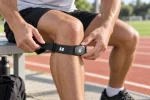 Quick fit: 3–5 cm below the kneecap, logo forward, AI module on the outer side, buckle secure, and one finger
 Activity Why the strap may shift Running Repeated flexion and extension Squatting Deeper knee bending changes leg shape Lunging Split
 The squat is one of the most widely used lower-body exercises.As you descend, your knees and hips flex while your