Buy 2 Xtand Orion Pro & Get 20% Off


- Before You Start — Safety Warnings
- Quick 3-Step Get Started
- Correct Wearing Guide
- Controls & LED Status Lights
- XTAND App Full Feature Overview
- Safe Sports & Daily Activity Usage
- Cleaning, Storage & Travel Rules
- Abnormal Conditions & Emergency Response
- Troubleshooting Common Issues
- Disposal, Recycling & Environmental Info
- Specs & Regulatory Compliance
- Warranty, Support & Appendices
Before You Start — Critical Safety Warnings
WARNING: Read Fully Before Wearing or Charging
This product contains a rechargeable lithium battery and pneumatic pressure system. Failure to follow all safety rules may cause skin injury, impaired blood circulation, burns, fire, falls or severe bodily harm.
Safety Symbols and Signal Words
| Signal Word | Meaning |
|---|---|
| DANGER | Indicates a hazardous situation that, if not avoided, will result in death or serious injury. Used only for immediate extreme hazards. |
| WARNING | Indicates a hazardous situation that, if not avoided, could result in death or serious injury. |
| CAUTION | Indicates a hazardous situation that, if not avoided, could result in minor or moderate injury. |
| NOTICE | Indicates information related to product damage, data loss, correct operation or regulatory compliance, rather than personal injury. |
Not a Medical Device
The XTAND Orion Pro and companion XTAND App are not medical devices. They cannot diagnose, treat, cure or prevent injury, disease or joint conditions. Real-time pressure, impact, gait and calorie metrics are estimated values only and must never be used for medical or emergency decision-making.
Product Overview — How It Works
The product uses sensors and software algorithms to identify movement patterns and adjust pneumatic pressure within the configured range. Actual recognition and support performance vary with fit, user anatomy, activity, clothing, environmental conditions, firmware and proper use.
The product does not guarantee injury prevention, balance, fall prevention or a particular athletic result.
Intended Use
ORION PRO is a consumer wearable support product intended to provide adjustable mechanical compression and support around the patellar region during ordinary walking, running, stair use, fitness activities and daily movement, within the limitations in this manual. It is intended for personal use by a user who can understand the instructions, communicate discomfort and remove the product without delay.
Who Should Not Use the Product
WARNING: Consult a Healthcare Professional Before Use
Consult a qualified healthcare professional before use if you have persistent knee pain, a diagnosed musculoskeletal or circulatory condition, diabetes, impaired sensation, a bleeding disorder, reduced mobility, recent injury or surgery, pregnancy, an implanted electronic medical device, or any condition that may be affected by compression or exercise.
Do not use on or near:
- Open wounds, ulcers or surgical incisions
- Infected, inflamed, burned, blistered or weeping skin
- Severe eczema, allergic dermatitis or active rash
- Areas with absent or significantly reduced sensation
- Areas with unexplained swelling, discoloration or severe pain
- A limb with suspected blood clot, acute vascular compromise or uncontrolled bleeding
Stop use and seek medical advice if symptoms develop.
Children and Vulnerable Users
This product is not a toy. Keep the device, charging cable, packaging and small components away from young children. A minor or vulnerable user may use the product only with continuous supervision by a responsible adult who can check fit, skin condition and circulation and can remove the device immediately.
Prohibited and Foreseeable Misuse
- Use the device while charging.
- Use it as protective equipment for work at height, climbing, motorcycling, skiing, combat/contact sports, aquatic sports or any activity where product failure could lead to serious injury.
- Use it to continue exercising through pain, numbness, instability or injury.
- Use it while sleeping, unconscious, intoxicated or unable to remove it independently.
- Use it on another body part.
- Combine it with braces, compression products, heating pads, electrical stimulators or medical devices unless approved by a qualified clinician and XTAND.
- Modify, puncture, crush, bend, open or repair the electronic module or air system.
Get Started in 3 Simple Steps
Complete unboxing, charging and app pairing before your first wear.
Step 1: Unbox & Full Inspection
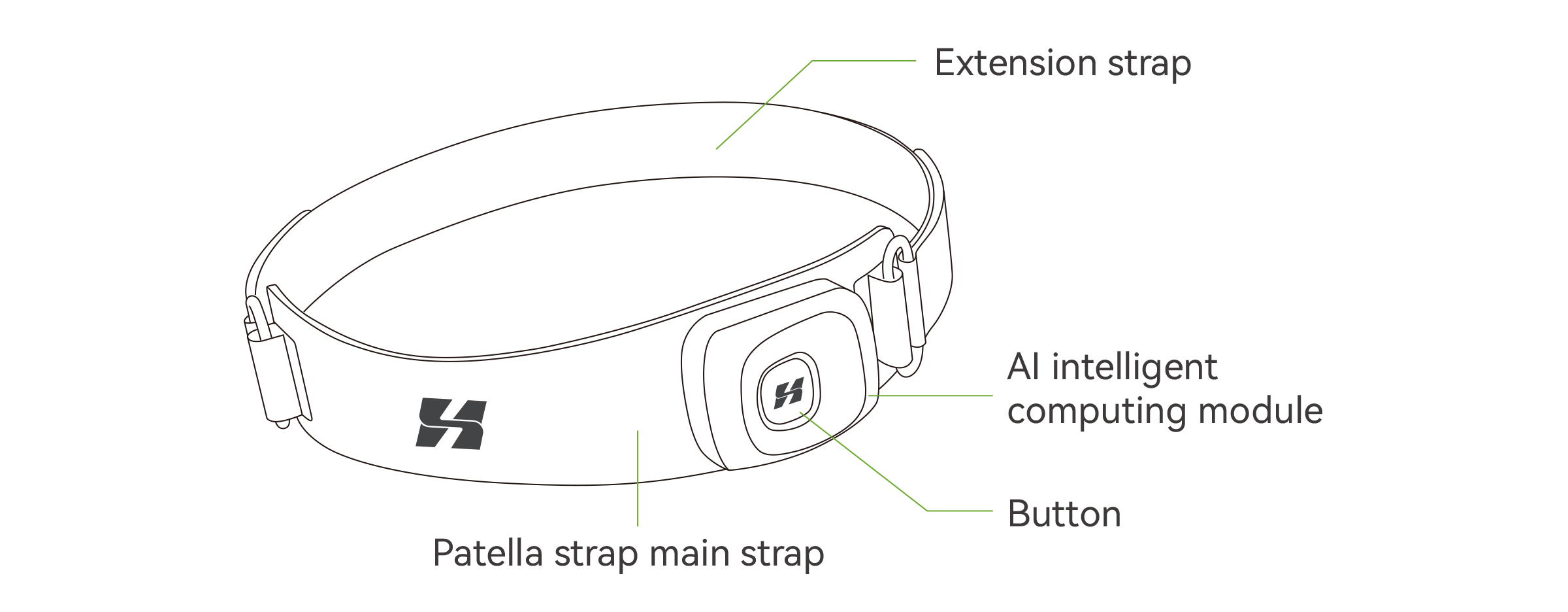
- Orion Pro patella strap main body
- Removable AI intelligent computing module
- Extension adjustment strap
- USB Type-C charging cable
- Official User Manual & Safety Guide
Step 2: Fully Charge the AI Module
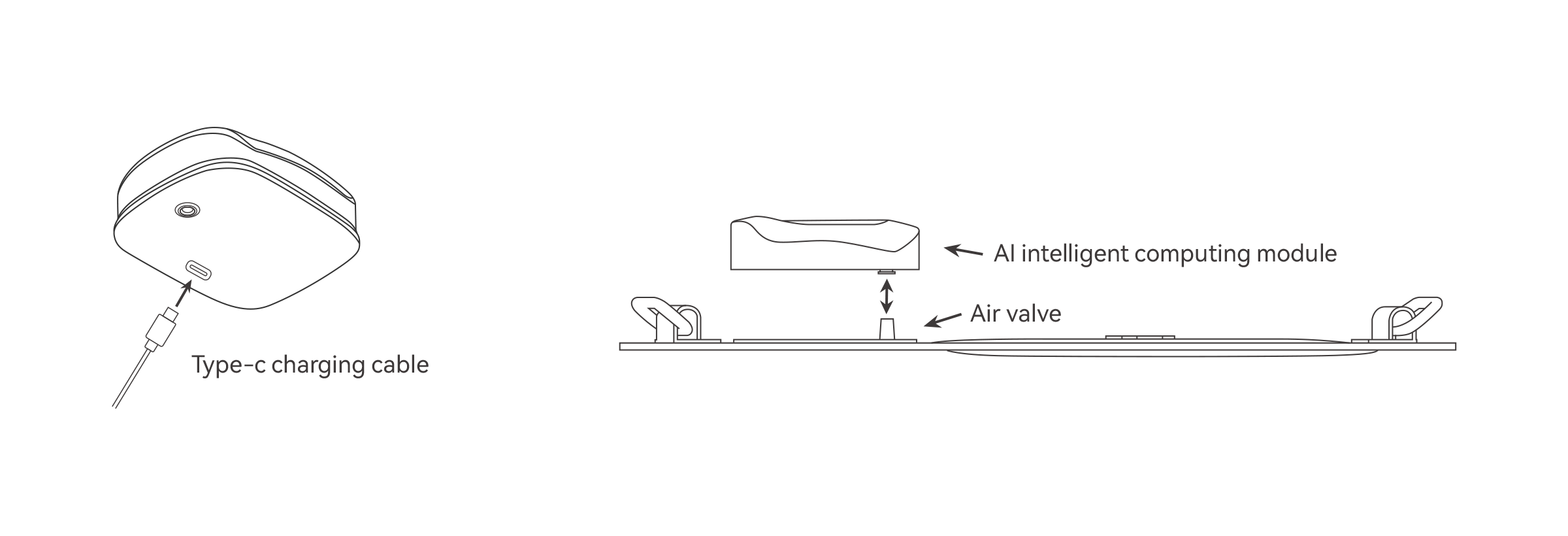
- Detach AI module from strap air valve
- Connect Type-C cable to bottom charging port
- Plug into certified DC 5V USB power supply
- Full charge: ~60 minutes; steady green LED = fully charged
- Battery life: 4–6 hours continuous use
Step 3: Pair XTAND App & Device
- Download official XTAND App from App Store / Google Play
- Enable Bluetooth, register & log into account
- Long press module button 3s to power on (orange fast flash)
- App: Me → Device → Add Device → Connect XTAND-Orion-G1
Fit rangeCompatible leg circumference: 34cm – 45cm. Do not force fit legs outside this range.
Package inspectionInspect the package immediately. Do not use the product if any item is missing, cracked, deformed, wet, swollen or otherwise damaged.
TraceabilitySerial/batch number: See product label or packaging. The serial or batch number must remain legible for traceability, warranty and safety investigations.
Before First Use — Initial Inspection
- Confirm that the model and package are correct.
- Inspect the module, strap, valve, buckle, cable and charging port.
- Do not use if there is cracking, deformation, swelling, leakage, corrosion, exposed wiring, unusual odor, water intrusion or a loose component.
- Confirm that the product is dry and at room temperature.
- Fully charge under supervision using a compatible certified power source.
- Download the official XTAND app only from an authorized app store.
- Read all safety warnings before wearing.
Wear Orion Pro Correctly
Assembly
- Confirm that the module and valve are clean, dry and undamaged.
- Align the module air outlet with the strap air valve.
- Press evenly until fully seated. Do not twist, strike or force the module.
- Power on and confirm the normal startup indicator. If startup fails, power off, remove the module and repeat the assembly.
- Do not use if the module is loose or the valve leaks.
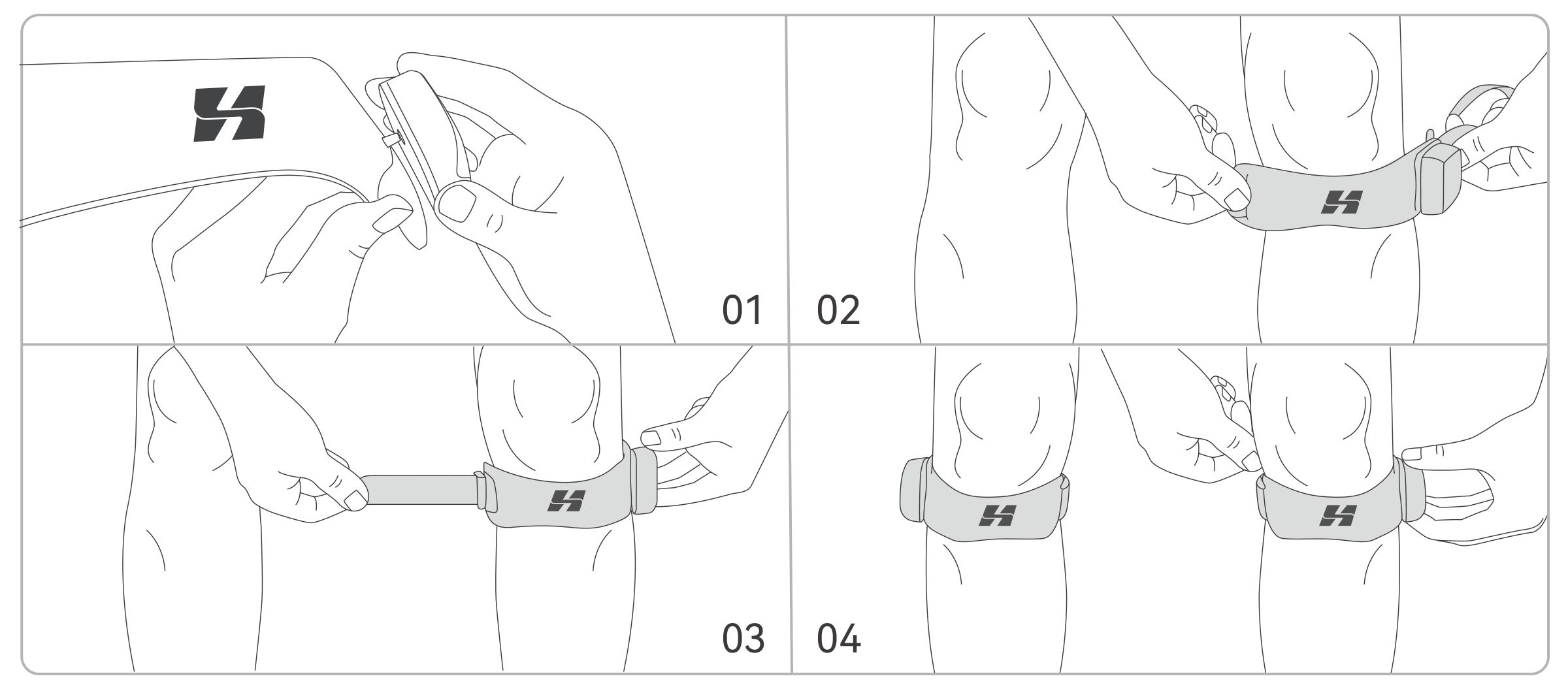
- Place the strap: Position the strap approximately 3–5 cm below the kneecap, with the logo facing forward.
- AI module position: Position the AI computing module on the outer side of the knee.
- Secure the buckle: Thread and secure the buckle.
- Adjust fit: Adjust until snug but not tight. You should be able to insert one finger under the strap without force.
- Power on: Power on by pressing and holding the button for approximately 3 seconds.
- Start at low pressure: Begin at the lowest suitable pressure and reassess comfort after several minutes.
WARNING: Circulation and Pressure Injury
Excessive tightness or pressure may impair circulation or injure skin, nerves or soft tissue. Stop immediately and remove the product if you experience numbness, tingling, coldness, discoloration, increasing pain, swelling, throbbing, burning or loss of sensation. Seek medical care if symptoms do not resolve promptly.
How to Remove
- Stop activity and stand or sit in a safe, stable place
- Press and hold the button to power off
- Wait until pressure is released
- Release the buckle and remove the strap gently
- Inspect the skin and knee area
- Remove the module before cleaning or charging
Fit Adjustments & Slipping
If the strap slips or rotates during use, stop activity and refit at the correct position. To prevent slipping, confirm size compatibility, ensure skin or under-layer fabric is dry, and secure the buckle properly. Do not use if the buckle or strap is worn or damaged.
Charging, Controls & Status Lights
DANGER: Fire, Explosion and Burn Hazard
This product contains a rechargeable lithium battery. Improper charging, impact, crushing, puncture, heat, water intrusion, incompatible power supplies or unauthorized repair may cause overheating, thermal runaway, fire, explosion, toxic smoke, burns or property damage.
Approved Charging Method
- Remove the AI computing module from the strap before charging.
- Place it on a stable, hard, dry, nonflammable surface with ventilation.
- Use the supplied cable or an undamaged, standards-compliant USB Type-C cable.
- Use only a certified SELV USB power source rated DC 5 V. Do not use an adapter with visible damage, loose pins or abnormal heat.
- Keep the charging port dry and free of debris.
- Connect the cable without force.
- Normal charging time is approximately 60 minutes. Disconnect when fully charged.
- Adult supervision is required when a minor uses or charges the device.
Never Charge When
- The device is being worn or used.
- The device, cable, connector or adapter is wet.
- The module is hot from exercise, direct sun or a vehicle interior. Allow it to return to room temperature first.
- The device is swollen, cracked, dropped, crushed, leaking, corroded or has an unusual odor.
- The charging connector does not fit normally.
- The device is covered by bedding, clothing, a bag or other insulating material.
- Near flammable liquids, gases, paper, bedding or other combustible materials.
- During an electrical storm or in an unsafe power environment.
Charging Supervision
Do not leave the product charging for an extended period without supervision, overnight or while you are away from the premises. Periodically check for excessive heat, smoke, odor, noise, swelling or discoloration. Disconnect immediately if any abnormality occurs.
DANGER: Smoke, Fire or Battery Failure
If the device emits smoke, sparks, flames, a strong chemical odor or rapidly increasing heat:
- Do not touch it with bare hands.
- Disconnect power only if it can be done safely.
- Move people away and call local emergency services.
- Do not inhale smoke.
- Do not reuse, ship or place the damaged device in household trash.
- Contact XTAND and follow local hazardous-battery disposal instructions.
Module Button Operation
- Power On: Hold button for 3 seconds
- Power Off: Hold button for 3 seconds (auto full air vent before removal)
- Mode & pressure tuning: Managed exclusively via XTAND App
LED Indicator Reference Table
| Device Status | LED Base Color | Light Animation |
|---|---|---|
| Charging In Progress | Red + Green | Gradient breathing flash |
| Fully Charged | Green | Solid constant on |
| Power Startup Ready | Orange | Rapid fast flashing |
| Active Intelligent Mode | White | Steady light |
| Walking Detection | Blue | Solid light |
| Running Detection | Yellow | Solid light |
| Stair Climbing Detection | Red | Solid light |
Pressure Adjustment Range
Nominal adjustable pneumatic pressure: 0 kPa – 50 kPa
- Intelligent Mode: Auto dynamic pressure tuning in 1–3 seconds based on knee flexion & impact
- Manual Mode: Fixed custom pressure set inside XTAND App
- Always start at lowest comfortable pressure; higher pressure increases circulation risk
Operating Modes
Intelligent Mode
Intelligent mode uses sensor input and software to adjust support based on detected activity. The white indicator shows that intelligent mode is active. Detection may be affected by improper fit, unusual gait, rapid transitions, loose clothing, low battery, sensor obstruction or software errors. Always remain aware of how the product feels. Do not assume the algorithm has correctly identified your activity.
Manual Mode
Manual mode applies the user-selected support setting. Begin at the lowest effective level. Higher pressure is not necessarily better and may increase discomfort or circulation risk. Do not change settings while crossing roads, using stairs or performing an unstable movement.
Pressure Comfort & Adjustment
If the pressure feels too high during use, immediately reduce the setting in the app, or power off and loosen the strap. Higher pressure is not always better and may increase discomfort. Do not continue use if you experience pain, numbness, or skin discoloration.
XTAND App Full Feature Breakdown
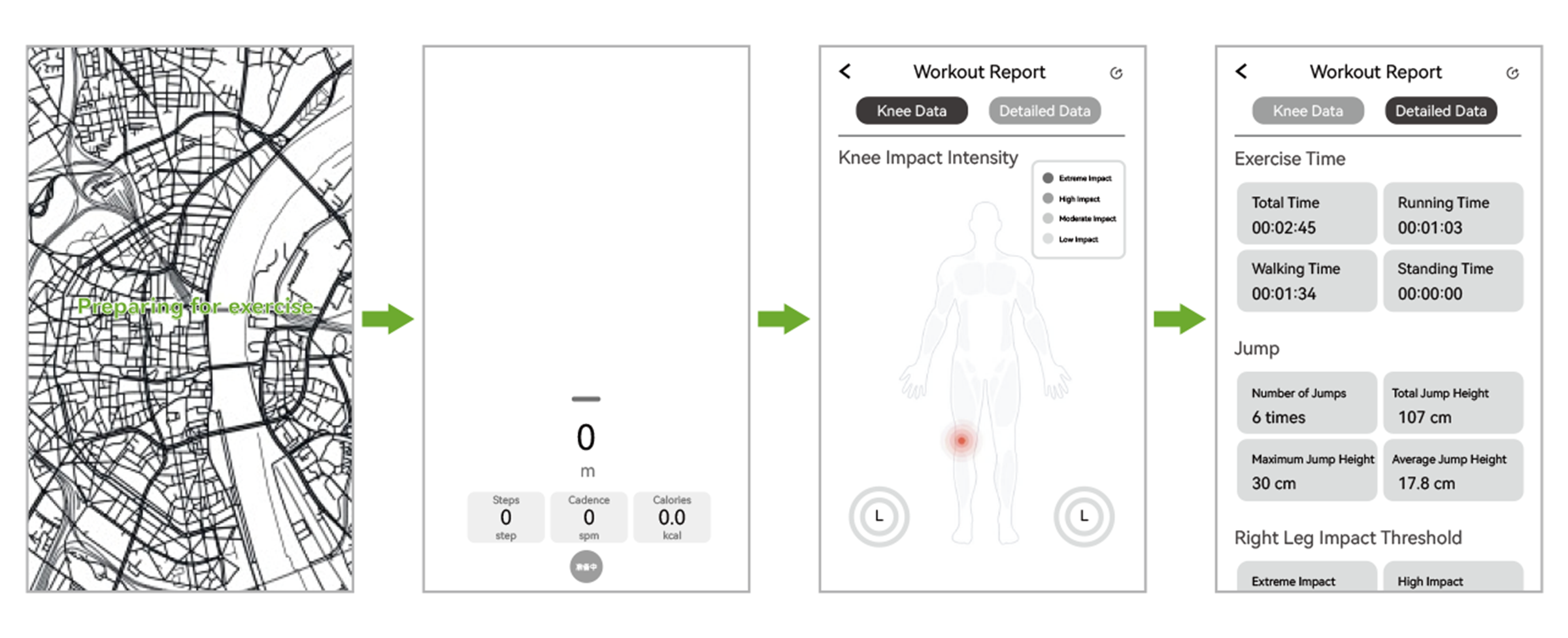
Main Dashboard Displays
- Real-time activity metrics: time, distance, steps, estimated calorie burn
- Live knee impact intensity & joint force readings
- Device panel: battery %, Bluetooth state, active mode, current kPa pressure
Connecting the App
- Download the official XTAND app from an authorized app store.
- Review the current privacy notice and permissions before registration.
- Turn on Bluetooth and keep the phone close to the device.
- In the app, select Me > Device > Add Device > Connect.
- Confirm that the displayed device name matches your product.
- Install firmware updates only through official XTAND channels and keep the device charged during an update.
Core App Modules
- Exercise Mode Selector: Intelligent Auto / Manual Fixed Pressure
- Workout Reports: Daily/Weekly/Monthly gait, jump impact, knee range of motion trends
- Personalized Settings: Body weight, sport goals, custom pressure alert thresholds
- Full Activity History Log: All past workout detailed records
- Firmware Update Portal: Official device upgrades only via XTAND App
WARNING: Do Not Rely on App Data for Safety or Medical Decisions
Step counts, calories, gait, movement classification, impact, range-of-motion trends, force and pressure information are estimates. They may be incomplete, delayed, inaccurate or unavailable. The app is not an emergency warning system and does not monitor for injury, blood-flow impairment or unsafe exercise.
Cybersecurity and Account Safety
- Use a strong, unique password and keep your phone operating system and app updated.
- Do not share verification codes or account credentials.
- Pair only with your own device in a trusted environment.
- Remove the product from your account before resale or transfer.
- If you suspect unauthorized access, change your password, disconnect the device and contact support.
- Bluetooth interruption or app failure does not make continued physical activity safe; stop and assess the product directly.
Safe Use During Sports & Daily Activity
WARNING: Injury and Fall Risk
The product cannot prevent all knee injuries or falls. It may move, lose pressure, misclassify activity, disconnect, run out of power or fail unexpectedly. Maintain normal training precautions, appropriate footwear, environmental awareness and safe movement technique.
Standard Safe Usage Guidelines
- Warm up before exercise.
- Test the product at low intensity in a controlled environment before higher-intensity use.
- Stop if the strap slips, rotates, loosens or changes gait unexpectedly.
- Do not use when driving or operating machinery.
- Do not adjust the app or product while moving in traffic, on stairs or on uneven ground.
- Avoid sharp objects and abrasive surfaces.
- Do not use in water, while swimming, in heavy rain, in a sauna, steam room or other high-heat/high-humidity environment.
- Do not continue use if battery is low and loss of support could create a hazard.
- Take regular breaks, remove the product and inspect the skin.
Environments to Avoid Wearing Orion Pro
- Heavy rain, swimming, showers, saunas, steam rooms (device non-waterproof)
- Locked car dashboards, extended direct midday sun extreme heat
- Driving motor vehicles, industrial machinery operation, motorcycle riding
Skin Checks & Duration
During first uses, check skin after 10–15 minutes and again after use. Users with sensitive skin may wear a thin clean layer of clothing if it does not interfere with fit or sensors. Do not use over ointments, lotions or wet skin. There is no universal safe maximum duration; comfort and circulation must be checked regularly.
Cleaning, Storage & Travel Instructions
WARNING: Electric Shock, Fire and Product-Damage Risk
The AI computing module is not washable and must never be immersed, rinsed under running water, machine washed, dry-cleaned or placed in a dryer. Water or detergent entering the module or charging port may cause corrosion, malfunction, overheating or fire.
Fabric Strap Cleaning (DETACH AI MODULE FIRST)
- Power off and fully separate electronic AI module from air valve
- Fasten all buckles to prevent fraying or snags
- Hand wash only cool/lukewarm water with mild gentle detergent
- No bleach, alcohol, solvent cleaners, fabric softener, wringing or ironing
- Rinse all soap residue completely
- Air-dry in shaded ventilated area — no tumble dry / direct sunlight
- Reassemble module only once strap is 100% dry
AI Electronic Module Care
Wipe the exterior with a soft, dry cloth. If necessary, use a cloth very lightly dampened with water, then dry immediately. Do not allow liquid into openings. Do not use compressed air, sharp tools or conductive objects in the charging port.
Maintenance Inspection
Before use, verify:
- Strap and stitching are intact.
- Buckle locks securely.
- Valve and module seat correctly.
- Charging port is clean and dry.
- Module does not rattle or separate.
- No swelling, corrosion, cracks, exposed wires or abnormal odor.
- Firmware and app are current where required.
There are no user-serviceable internal parts. Contact XTAND for service.
Long-Term Storage Rules
- Power off, release air pressure, clean and fully dry all components
- Store cool, dry, ventilated; away from heaters, flame, direct sunlight
- Storage temperature range: 0°C – 45°C
- Do not stack heavy objects on device; separate from metal short-circuit risks
- Recharge module to 50% battery every 30 days for multi-week storage
Transport and Air Travel
Protect the module from impact, crushing, moisture and extreme temperature. Do not ship a damaged, swollen, recalled or thermally affected lithium-battery product through ordinary mail or courier channels. Follow the carrier's current dangerous-goods rules. For air travel, carry and use the product only as permitted by the airline, airport and applicable battery rules. Turn off Bluetooth and the device when instructed.
Abnormal Conditions and Emergency Response
Stop Use Immediately If
- Smoke, sparks, flame, swelling, leakage or strong odor
- Unusual or rapidly increasing heat
- Cracking, deformation, water intrusion or impact damage
- The module detaches or the strap fails
- Pressure does not release
- Unexpected continuous inflation or abnormal vibration/noise
- Numbness, tingling, coldness, discoloration, severe pain, swelling, rash or burning
- Dizziness, loss of balance or altered gait
- App or firmware behavior that could affect safe operation
Immediate Response
- Stop moving and go to a safe, stable position.
- Power off the product if safe.
- Release the buckle and remove the product. If it cannot be removed without pain or injury, seek emergency help.
- For skin or circulation symptoms, stop use and monitor. Seek urgent care for severe, persistent or worsening symptoms.
- For smoke/fire/battery failure, follow the battery emergency instructions in the Charging section.
- Do not restart, recharge, repair, ship, sell, gift or dispose of the affected device until XTAND or a competent authority provides instructions.
- Preserve the product, packaging, charger, purchase record, photographs, app screenshots and serial/batch number for investigation, unless doing so is unsafe.
Report Safety Incidents
Report any injury, burn, fire, smoke, property damage, unexpected inflation, pressure-release failure or other safety event to XTAND promptly. Include the product model, serial/batch number, purchase date, activity at the time, and a clear description. Depending on the country, consumers may also report unsafe products to the relevant market-surveillance or consumer-safety authority.
Troubleshooting Common Issues
| Fault Symptom | Immediate Action Steps |
|---|---|
| Device fails to power on | 1. Charge module 30+ mins with certified 5V charger
2. Re-seat module fully onto air valve
3. Stop use if swollen, wet or dropped |
| Charging light does not activate | 1. Re-seat Type-C cable both ends
2. Wipe charging port dust with dry cloth
3. Cool hot module fully before charging |
| XTAND App cannot locate device | 1. Confirm module powered on with orange flash
2. Toggle Bluetooth & grant app location permissions
3. Reboot phone + App, place phone within 30cm of module |
| Abnormal continuous auto-inflate | 1. Power off instantly
2. Detach & re-seat module flush to air valve
3. Stop reuse if air valve leaks after re-assembly |
| Pressure cannot release after power off | 1. Carefully unfasten buckle to manually vent air
2. Discontinue all use & contact XTAND Support |
| AI module overheats mid-use | 1. Power off instantly & remove from skin
2. Place on cool non-flammable surface
3. Do not recharge before support review |
Disposal, Recycling and Environmental Information
WARNING: Do Not Place Lithium-Battery Products in Fire or Ordinary Trash
Lithium batteries may cause fire in waste trucks, bins and recycling facilities. Do not incinerate, crush or place the product in household trash or ordinary curbside recycling. Follow local electronic-waste and battery collection requirements.
Separate Collection
The crossed-out wheeled-bin symbol means the electrical product must be collected separately from unsorted municipal waste. Remove personal account data where possible and deliver the product to an authorized collection point. A damaged or thermally affected battery may require special hazardous-waste handling; contact local authorities before transport.
Material Compliance Statement
Any RoHS, REACH or hazardous-substance statement must be supported by current model-specific test reports, supplier declarations and technical documentation.
Technical Specifications & Regulatory Compliance
Orion Pro Official Spec Sheet
| Brand | XTAND |
| Model | ORION PRO Intelligent Patella Strap |
| Total Weight | ~52g |
| Compatible Leg Circumference | 34cm – 45cm |
| Charging Input Voltage | DC 5V |
| Lithium Battery Capacity | 80mAh / 0.296Wh |
| Full Charge Time | ~60 minutes |
| Battery Runtime | 4–6 hours (mode dependent) |
| Adjustable Pressure | 0–50 kPa nominal |
| Operating Temperature | 0°C to 45°C |
| Storage Temperature | 0°C to 45°C |
| Bluetooth Version | Bluetooth 5.1 |
| Supported OS | iOS 12.0+ / Android 10.0+ |
| Water Resistance | Not waterproof |
| FCC ID | 2BOZY-R102 |
Specification Changes
Specifications and software features may change to improve safety, compliance or performance. Material changes affecting safe use will be communicated through updated labeling, manuals, the app, website or direct safety notice as appropriate. Do not rely on a superseded manual.
United States — FCC Part 15
This device complies with Part 15 of the FCC Rules. Operation is subject to the following two conditions: (1) this device may not cause harmful interference; and (2) this device must accept any interference received, including interference that may cause undesired operation. Changes or modifications not expressly approved by the party responsible for compliance could void the user's authority to operate the equipment.
European Union
Before placing the product on the EU market, the responsible economic operator must confirm the applicable legislation, conformity-assessment route, harmonized standards, Declaration of Conformity, CE marking, traceability, EU Responsible Person details, WEEE/battery obligations and required local-language instructions. For EU sales, English alone is not sufficient in every Member State. Provide instructions and safety information in the language(s) required by each destination country.
United Kingdom and Other Markets
Additional markings, responsible-person details, radio approvals, recycling registrations, privacy notices and local-language requirements may apply in the United Kingdom, Canada, Australia, Japan and other markets. Confirm market-specific requirements before sale and do not assume CE or FCC documentation covers every country.
Certification Marks
Print FCC, CE, RoHS, WEEE or other marks only when:
- The exact model and configuration are within the verified scope.
- Valid reports, certificates or declarations are available.
- The mark's size, format and accompanying information meet applicable rules.
- No material hardware, radio, battery, software or supplier change has invalidated the evidence.
Limited Warranty & Customer Support
Limited Consumer Warranty Terms
Subject to applicable mandatory consumer law, XTAND provides a limited warranty from the original retail purchase date for defects in materials and workmanship under normal intended use. The specific warranty period varies by country of sale and must match the terms offered in the country of sale. This warranty may not reduce statutory consumer rights.
Warranty coverage excludes damage caused by:
- Misuse, accident, impact, crushing, puncture, liquid intrusion or extreme temperature
- Charging with incompatible or damaged equipment
- Unauthorized modification, disassembly, repair or software alteration
- Normal wear, cosmetic damage or consumable textile deterioration
- Failure to follow instructions, cleaning or storage requirements
- Use outside the intended purpose or size range
- Products with altered or unreadable serial/batch information
- These exclusions do not apply where prohibited by law and do not exclude liability that cannot lawfully be excluded.
Service Process
Before returning a product:
- Stop use if there is any safety concern.
- Contact XTAND support and obtain return instructions.
- Do not ship a swollen, leaking, burned, overheated or otherwise damaged lithium-battery device without specific dangerous-goods instructions.
- Back up any app information you wish to keep.
- Provide proof of purchase, serial/batch number, description, photographs and incident details.
- Remove personal account pairing where safe and appropriate.
No Unlawful Limitation of Rights
Nothing in this manual excludes, restricts or modifies rights or remedies that cannot legally be excluded, restricted or modified under applicable consumer-protection or product-liability law.
How to Submit Support & Warranty Requests
- Support Email: hello@xtand.ai
- Safety Incident Portal: xtand.ai/product-safety
- Required info: model, serial/batch number, purchase date, fault photos, full issue description
- Battery fire/overheat emergency contact: security@xtand.com.cn
Manufacturer & Company Information
Legal name: Mebotx Intelligent Technology (Suzhou) Co., Ltd.
Registered address: 9/F, Building 1B, Start-up Zone, Yangtze River Delta International R&D Community, No. 286 Qinglonggang Road, High-Speed Rail New City, Xiangcheng District, Suzhou, Jiangsu, China
Email: hello@xtand.ai
Safety incident contact: security@xtand.com.cn
Telephone: 86-0512-65109039
Website: https://xtand.ai
Return Rule: Discontinue use of malfunctioning device before return shipping. Do not ship swollen/leaking battery modules without official hazardous goods instructions from XTAND support.
Appendix A — Quick Safety Checklist
Before every use:
- ☐ Product, strap, buckle, valve and module are undamaged.
- ☐ No swelling, leakage, odor, corrosion, cracks or abnormal heat.
- ☐ Skin is clean, dry and free of wounds or active irritation.
- ☐ Size and wearing position are correct.
- ☐ Pressure starts at the lowest effective level.
- ☐ Charging is complete; the product is not connected to power while worn.
- ☐ Environment is dry, safe and free of traffic or fall hazards.
- ☐ User can remove the product immediately.
- ☐ App data is not being treated as medical or emergency information.
- ☐ Serial/batch number and support contact are available.
Appendix B — Incident Reporting Record
Use this form to record details when reporting a safety incident to XTAND:
- Reporter name
- Contact information
- Country
- Product model
- Serial or batch number
- Purchase date and channel
- Incident date and local time
- Activity at the time
- App/firmware version
- Charger/cable used
- Description of event
- Injury or medical treatment
- Property damage
- Photos/videos/screenshots preserved
- Product isolated and not reused
Appendix C — Regulatory and Risk-Control Basis
Purpose
This appendix records the principal public sources used when drafting the safety structure. It is not a declaration of conformity and does not replace model-specific legal advice, testing or certification.
Reference Summary
- EU General Product Safety Regulation (EU) 2023/988, especially manufacturer risk analysis, traceability, contact channels, clear instructions and safety information, corrective action and recall obligations.
- U.S. Consumer Product Safety Commission public safety warnings concerning lithium-ion battery overheating, ignition, explosion, charger incompatibility and hazardous-battery disposal.
- EU WEEE Directive 2012/19/EU, including the crossed-out wheeled-bin marking for separate collection of electrical and electronic equipment.
- FCC Part 15 statements must be confirmed against the exact equipment authorization filing and model-specific user-manual exhibit.
- Original ORION PRO English user manual supplied by XTAND.
Required Pre-Release Approvals
- Engineering: confirm battery chemistry, capacity, charging controls, temperatures, IP rating, pressure accuracy, failure modes and emergency shutdown.
- Quality/Regulatory: confirm test reports, labeling, serial/batch traceability, translations, complaints and recall process.
- Legal: review warnings, intended use, warranty and jurisdiction-specific consumer law.
- Privacy/Cybersecurity: review app claims, data categories, permissions, retention and incident process.
- Insurance: provide the final manual and risk analysis to the broker/underwriter if requested.
Download Full Official Orion Pro PDF Manual
Get printable offline safety & user guide for storage or print.